
If you use Microsoft Word, Excel or
Outlook, then you’d better keep on
your toes: You are vulnerable to one of
the most common pests on the Internet
today. The electronic bete noire is the
macro virus, a little program that, unlike
general computer bugs, hides inside a
word processor document or spreadsheet
and can do a world of damage to beginners
and sophisticated computer buffs alike.
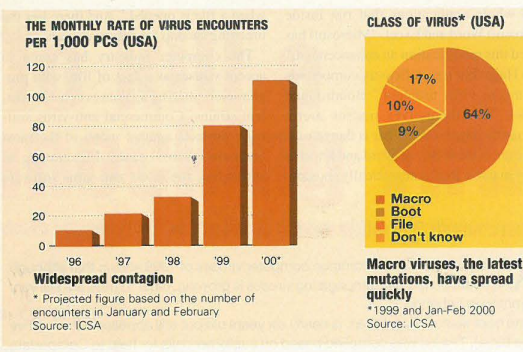
Globally, more than one in ten of all computers
are expected to encounter a virus in any
given month. This startling figure is the projected
forecast by the International
Computer Security Association (ICSA) and
represents a 3% increase over last year. In the
ICSA study that polled IT professionals
from 300 large US corporations with some
750,000 PCs, the 8% monthly rate of virus
alerts that were reported in 1999 is expected
to grow to 11% this year (see graph).
In Lebanon, in the absence of official surveys,
figures for the number and frequency of
viral attacks are at best approximate. Some
estimates, loosely based around the number
of panicked customers who phone their dealers
for help, put the toll as high as 5% a
month, while others insist on the more salubrious
rate of 1% of all PCs. The average
brings the Lebanese rate of infection in line
with US figures given that not all virus
encounters actually develop into full-blown
infections. “But virus infections are definitely
on the rise,” says Mihran Boudromian,
head of Expervision’s software and sales
department. “A lot has to do with the fact that
more viruses are being created.” Georges Hajj, senior consultant
for Compudata, concurs. “It’s a
Catch-22 situation: the more antivirus
programs there are, the
more new viruses there are that
can beat them and the more
there is a need to update existing
anti-viruses.” Between
them, Compudata and
Expervision have a client
base of some 400 customers
on maintenance
accounts
ranging from corporate
to private
PC owners.
In the ICSA
study, by far the
biggest problem was
deemed to be the rise of
macro viruses. The survey
found that incidents of macro-virus infections
had doubled on average every four
months in 1999 and that some 64% of all
reported viruses were macro-induced, compared
to 46% a year earlier. Boot-sector
viruses, which attack the program that boots up the
computer, and file-infector viruses each
accounted for about 10% in both years.
“This is one aspect of technology where
I don’t mind lagging behind the West,”
says Boudromian cheekily. “Although
we’re receiving an increasing number of
macro-attacks, the main e-invaders are still
boot and file viruses.” Though potentially as
fiendish and destructive as their macro
counterparts, these viruses are unambiguous
programs with a clearly-defined icon when
running in Windows.
Somewhat paradoxically, the main reason
for this variance with the West is the higher
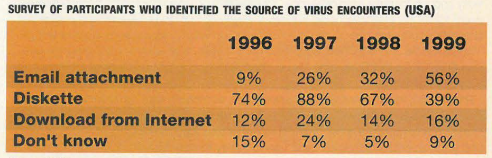
occurrence of software piracy. “Most of
our viruses have come from diskettes or
pirated CDs, rather than off the Internet like
Chernobyl for example,” he says,
referring to last year’s virus attack that
caused mayhem across Asia and the
Middle East as 600,000 PCs crashed. “But
we’re catching up,” adds Boudromian.
“Within a year, our computers should be as
macro-ridden with disease as in the West.”
A macro is a small chunk of code that can automate tasks like formatting. But macros
can also execute malicious actions and
spread as viruses, infecting a computer in
the way a retrovirus, such as HIV, infects the
human body. The macro virus starts running
when your word processor, for instance,
opens an infected file. Once it is running, the
virus copies itself into the word processor,
again like a retrovirus that is intent on
invading the DNA of a human cell. Once
infected, the macro virus runs every time
you open an existing document with your
word processor or create a new one. When
it runs, the virus makes a copy of itself into
the file, infecting the new file.
“The root to the macro problem,” says
Hajj, “is that Word makes it easy to send a
complex document complete with fonts,
pictures and even embedded spreadsheets.”
It is therefore very convenient to email
a Word file from one person to another,
which, when coupled with the growing
popularity of email, produces a related
boom in email-borne viruses.
Most common computer viruses of 1999
An analysis of the most common computer viruses of 1999 shows that although
the threat of new self-propagating viruses is growing, older viruses are still very
common in Lebanon.
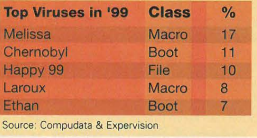
One boot sector virus, Ethan, is nearly six years old but still appears in the top five
(see table). The list was compiled based on customer calls for help to Compudata
and Expervision.
The three self-propagating viruses on the list were Melissa, Laroux and Happy99,
which forward themselves by hijacking a computer’s email program. This means
that instead of taking months to spread into the wild, these viruses have the potential
to attack globally within days.
However, Georges Hajj, senior consultant for Compudata, believes that old
viruses still pose a major threat: “Some viruses become so common, they will never
become extinct; they will always lurk on a floppy disk in someone’s drawer.”
According to Hajj, the key to long-lived viruses is being virtually invisible. “Viruses
which jump up and down with very destructive payloads draw attention to themselves
and effectively kill themselves off.”
What computer bugs do once inside your PC depends on the fiendishness of their
creators. Some, like Happy99, merely display annoying messages or graphics
on your screen. “Happy99 does nothing, it just spreads, although it still causes damage
by using up system resources.”
But others, such as the Chernobyl virus, are highly damaging, capable of corrupting
the motherboard and thereby hoodwinking the computer into believing it has no
hard disk. This permanently cripples the machine and deletes all stored data, necessitating
the purchase of a new motherboard and BIOS chip that can cost anywhere
between $90 and $120.
While having a hard disk wiped by
a virus may seem the computer
equivalent of Armageddon, many
companies and individuals are fortunately
in the habit of keeping
back-up copies of information and
sensitive files.
Boudromian is similarly concerned by
the rise in infections. “Macro viruses will be
driving the increased virus infections in
Lebanon,” he predicts. “We have entered an
age of pandemic contaminations at speeds of
light, when a single virus has the capacity to
bring a million PCs to a grinding halt.” In this
explosion of macro viruses that promises to
be a growing threat to our information
economy, it is almost with nostalgia that he
looks back at 1995, when “absolutely the
only serious threat of infection came from a
faulty floppy disk or a pirated CD.”
Macro viruses didn’t exist prior to the
release of Microsoft Word 95. But with Word 95
and later versions, Microsoft added the ability
to store macros in files along with text. As
a result, one of the telltale signs of having an
infected copy is that the word processor will
only save Word template files, since this is the
only way that the macro can propagate.
Since then, newer releases of Microsoft
Word and Excel have had the ability to
store macros in ordinary document files.
Being able to store macros inside a word
processor is a powerful feature. For example,
you can have a macro that computes the
terms of an installment loan, or that automatically
asks a few questions and then
draws a graph. Many businesses have created whole applications that run inside
Microsoft Word and Excel. “Microsoft has
called this modification an enhancement,”
says Hajj, “but it significantly compounds
the macro virus problem.” Boudromian
agrees: “By themselves macros aren’t
inherently dangerous. What is dangerous,
however, is the ability of Word and Excel to
have macros that automatically execute when a file is opened.” And there lies the
breeding swamp for macro viruses.
The computer industry has come to
accept viruses as a fact of life, with programmers
striving against ever more virulent
strains. Commercial anti-virus software
protects against many of the most
common macro viruses. Functioning as
antibodies, the latest anti-virus software such as Norton AntiVirus 2000 and
McAfee VirusScan, which between them
grab over 80% of the local market, recognize
some 14,000 known strains of viruses
that can worm their way into systems.
Playing Russian roulette may have its aficionados,
but clearly the best solution
remains to shield your computer with the latest
in anti-virus software.
However, it’s worth bearing in mind that
even though anti-virus software will fight the
most common Word macro viruses, it’s not a panacea. Anti-virus vendors estimate that
as many as 200 to 300 new viruses are created
every month simply because it’s easy for
a computer programmer to take an existing
Word macro virus, make a few changes and
create a new virus that won’t be detected.
An important factor in the flurry of virus
incidents, almost as important as the
attacks themselves, is the laxity in updating
anti-virus software regularly, scanning
incoming email and attachments, improper
installation and too little attention to anti-virus policies for remote users. “We do our best to
inform and encourage our customers to be
vigilant at all times,” says Hajj, “but unfortunately
there’s still a great deal of lethargy
when it comes to adopting safe controls.”
In the American ICSA survey, about 60%
of those respondents who had been infected
correctly diagnosed the disaster from the
start. Put another way, 40% of computer
users took some time to realize they had
caught a bug.
“Of course the surest way to avoid being
infected by macro viruses is to disable
them,” says Imad Tiba who teaches a computer
course at Business, Engineering
Studies and Technology. “You can do this
under Microsoft Word 97 and later versions
including Word 2000 by changing your
macro security setting.” Of the three settings
that are available, the low setting lets Word
run any macro that it finds. “Don’t use this setting,”
insists Tiba. “Instead, specify high
security, which disables all macros unless they
are signed by a so-called trusted source.”
The program lets you specify which signatures
that it should trust; the rest are automatically
ignored. There is also a medium
security setting. In this mode, a warning
pops up each time a file that contains macros
is opened, giving the user the choice to have
them enabled or disabled. Most users are
recommended to leave their security setting
on high, since, as Tiba advises, “there is no
way of telling beforehand if a macro is going
to be safe or not.” Boudromian puts it more
jocularly: “it’s the electronic equivalent of not
handing your credit card and car keys to a
complete stranger.”
And while being infected by an electronic
bug is anything but funny, to some virus programmers,
creating such widespread panic
with a few lines of computer commands is all
a joke. The boot-virus W97M_AUTOEXEC,
for instance, carries a riddle. When recipients
of the virus open an infected document, they
are presented with a question and given three
chances to answer. Possible results include the
messages, “You are wise, please choose this
again later,” “Congratulations,” and “Stop it!
You are so incurable, lose three chances!
Now, God will punish you …”
In this case, ‘divine punishment’ consists,
quite predictably, of deleting all the files on
the hard drive.
Spring cleaning your computer
If your 6-gigabyte hard drive is already half full with unneeded files, program remnants,
cached Web files and other useless garbage, now may be the time to clean
out the cobwebs.
Think of a PC-user as a litter-lout leaving cigarette butts, candy wrappers,
Almaza bottles and used Kleenex tissues all over the pristine landscape of your hard
drive. A typical Windows program installation scatters support files in several directories,
so you can’t simply lay waste to a single folder to get rid of all the litter.
Well-written Windows software registers how to uninstall itself either in the
add/remove programs utility in the control panel or in the folder it builds in the programs
menu. Using an uninstaller generally gets rid of most traces of a program,
but it can leave things like shared support files, saved games or data behind.
You can clear a little more space by dumping your temporary Internet files, but not
really enough to make a big difference. You can also go on a search-and-destroy mission through
every folder on the drive using Windows Explorer, but don’t kill anything you’re not
absolutely sure about because you could wind up with a very expensive paperweight.
Windows 98 and Windows 2000 also have a utility that automatically dumps useless
files. Go to the Programs Menu, then Accessories, then System Utilities and
pick Disk Cleanup.
Then again, there’s always the more radical, scorched-earth approach: If your PC
is so totally bogged down by all the stuff you’ve downloaded, your quickest course
of action is to nuke the drive. You just reformat and load the essentials, Office 2000
and your favorite wallpaper, and you’re ready to start cluttering things up again.
